
Two-Sided Mug Design Size for Sublimation
A two-sided mug has one design on each side of the handle, so it looks right whether it's held in the left or right hand. The trick is sizing each design so it sits in the middle of its side, clear of the handle and the seam. Here are the sizes, the pixel dimensions, and an easy way to set it up.
By the CraftSizer team · Updated 2026-10-19
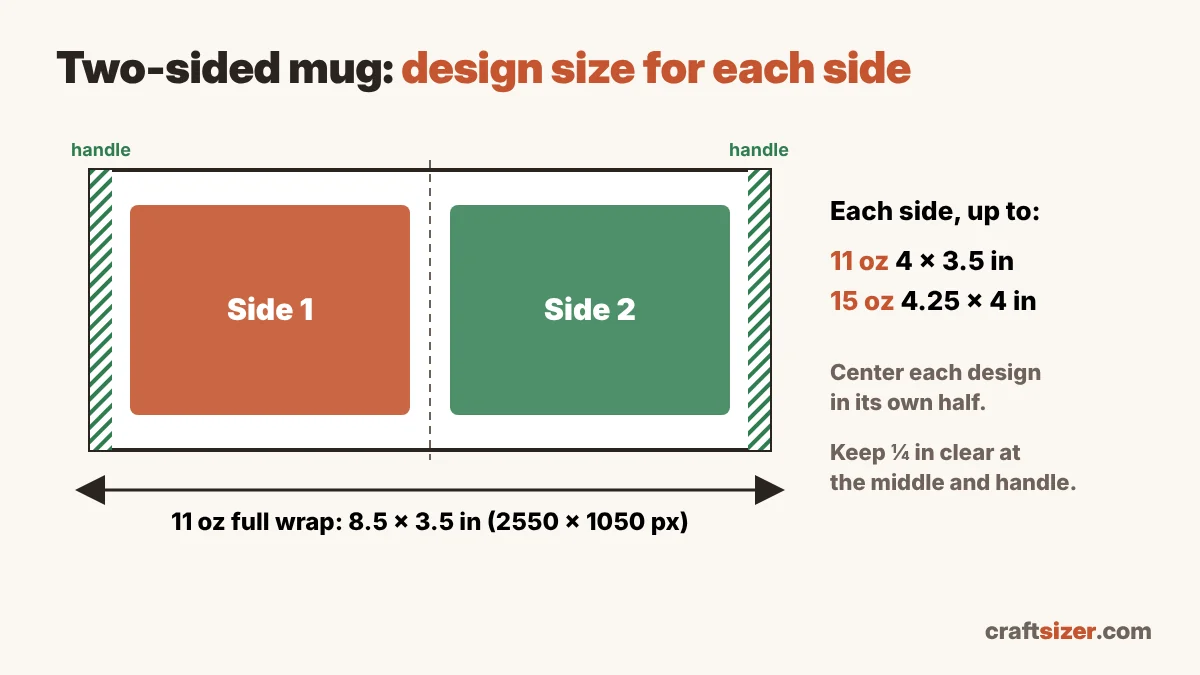
Two-sided mug design sizes
| Mug | Full wrap template | Each side, up to | Each side at 300 DPI |
|---|---|---|---|
| 11 oz | about 8.5 × 3.5 in | about 4 × 3.5 in | 1200 × 1050 px |
| 15 oz | about 9 × 4 in | about 4.25 × 4 in | 1275 × 1200 px |
Typical sizes. Mug blanks vary by brand, especially 15 oz. Measure yours and use the mug template size calculator, which shows the size for each side.
"Each side" is the largest area your design should fill. Most designs look best a little smaller, with about a quarter inch of space around them, so nothing gets close to the handle or the rim.
The easiest setup: one full-wrap canvas
Instead of printing two small pieces, make one canvas the size of the full wrap and put a design on each half. It's quicker to tape, and both sides line up automatically.
- In Canva (or any design app), create a custom size of 2550 × 1050 px for an 11 oz mug, or about 2700 × 1200 px for a 15 oz mug.
- Add a vertical guide in the middle. The left half is one side of the mug, the right half is the other.
- Center the first design in the left half and the second in the right half. On an 11 oz canvas, the centers are about 637 px and 1912 px from the left edge.
- Leave at least 75 px (a quarter inch) of empty space on each side of the middle line and at both short ends. The ends sit beside the handle.
- Download as PNG, then mirror when printing.
The mug calculator can download a blank template with these guide lines already drawn in, at the right DPI.
Which side does the drinker see?
When you hold a mug in your right hand, you see one side and everyone else sees the other. With a two-sided mug you don't have to choose, which is why it's the safer option for gifts.
If the two sides are different (say, a name on one and a quote on the other), check before you press: print the design on plain paper without mirroring, wrap it around the mug with the ends at the handle, and hold it the way the person will. It takes a minute and saves a mug.
Common two-sided mistakes
- Design too close to the handle. The paper can't press flat right beside the handle, so edges come out faded. Keep the quarter-inch space at both ends.
- Designs not centered on each half. If one design is shifted, it ends up off-center when the mug faces you. Center each one in its half, not on the whole canvas.
- Using a front-only size. A design sized for the whole front can run into the handle area when it's repeated. Use the "each side" size.
- Blurry print. Each side is only about 4 inches wide, but small text still needs a sharp file. Check it with the DPI checker.
Not sure which mug size to stock? See 11 oz vs 15 oz mugs for sublimation.
Frequently asked questions
What size should a two-sided mug design be?
On an 11 oz mug each side is up to about 4 × 3.5 inches (1200 × 1050 px at 300 DPI). On a 15 oz mug each side is up to about 4.25 × 4 inches. Mug blanks vary, so measure yours.
What Canva size do I use for a two-sided 11 oz mug?
Make one canvas of 2550 × 1050 px for the full wrap, then center one design in each half, leaving about 75 px of space at the middle and at both ends.
Should I make a mug one-sided or two-sided?
Two-sided works for both left- and right-handed people, so it's the safer choice for gifts. A one-sided design faces the drinker only when the mug is held in one particular hand.