
Which Side of Sublimation Paper Do You Print On?
Sublimation paper has a coating on one side that holds the ink until it's heated and released onto your blank. Print on the wrong side and the colors come out pale, blotchy or barely there. The good news: the right side is easy to spot once you know what to look for.
By the CraftSizer team · Updated 2026-11-15
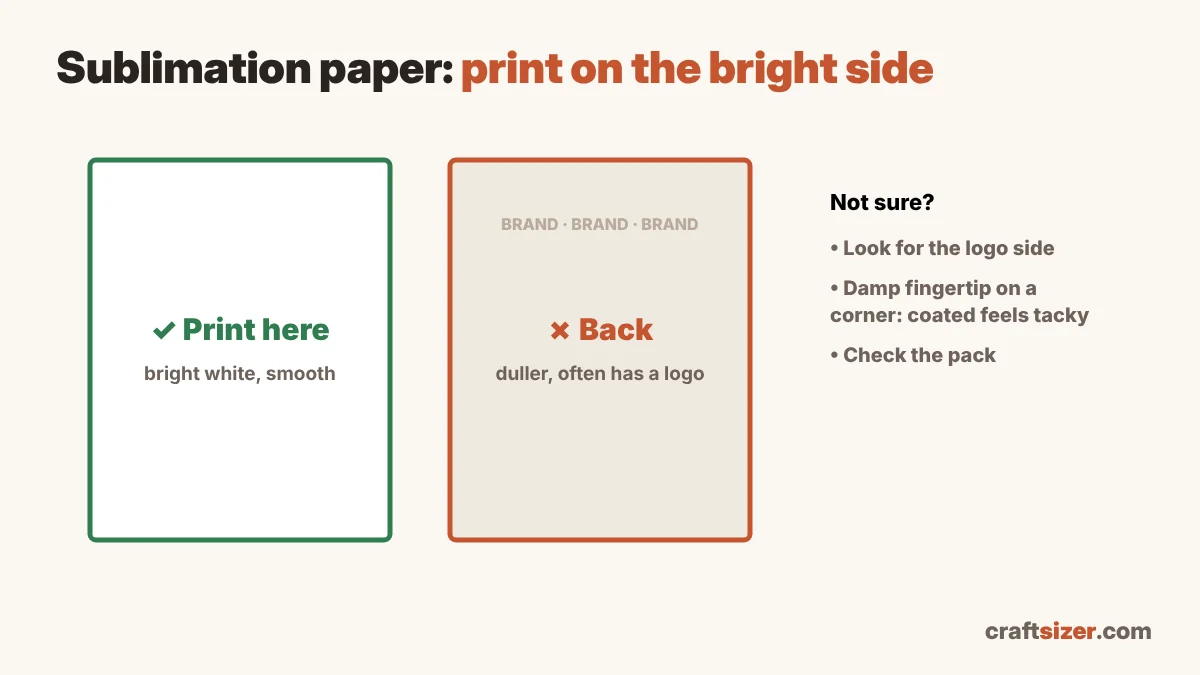
The short answer
Print on the bright white, smooth side. That's the coated side that holds the ink. The back is usually a little duller or off-white, and many brands print their logo or a pattern on it, so the side with the logo is the side you don't print on.
How to tell the sides apart
- Look for the logo or pattern. Many brands mark the back with a repeating logo, lines or text. Print on the plain side.
- Compare the whiteness. Hold the sheet under good light and tilt it. The coated side is usually brighter white.
- Feel the texture. The coated side often feels slightly smoother or a little different from the back.
- Try a damp fingertip on a corner. The coated side often feels a little tacky when slightly damp, while the back doesn't. Use a scrap corner, not the area you'll print on.
- Check the pack. Most sublimation paper packs say which side to print on, and some mark it with an arrow.
Brands differ. If your paper's instructions say something different, follow them.
Loading your printer the right way
Printers feed paper differently, so "face up" isn't the same on every model:
| Printer type | Usually load the print side |
|---|---|
| Rear feed (paper goes in the top at the back) | Facing you / face up |
| Front cassette tray (common on Epson EcoTank) | Face down in the tray |
| Bypass or manual feed slot | Check the icon on the slot or the manual |
Not sure? Mark an X in pencil on one side of a plain sheet, print a test page, and see which side the ink lands on. Then you'll know for every sheet after that.
What happens if you print on the wrong side?
The back of the paper isn't designed to hold sublimation ink. The ink soaks in unevenly or beads up, and when you press, very little transfers. Typical signs:
- Pale, washed-out colors
- Blotchy or speckled areas
- Ink that looks wet or smears on the paper
If the print looks dull on the paper, that's normal for sublimation: colors brighten when pressed. But if the pressed result is still faded, check the paper side first, then your settings in the time and temperature chart, and see sublimation problems and how to fix them.
Other paper tips
- Mirror your design before printing (for most blanks), so text reads correctly after pressing.
- Pick the right size. Letter fits most mug and 20 oz tumbler wraps sideways; 30 oz tumblers need 11 × 17. See the sublimation paper size guide.
- Print sharp. Aim for about 300 pixels per inch at the final size; check with the DPI checker.
- Store paper flat and dry. Humidity can make prints blotchy.
Frequently asked questions
Which side of sublimation paper do you print on?
The bright white, smooth (coated) side. The back is usually duller and often has the brand's logo or a pattern printed on it.
What happens if you print on the wrong side of sublimation paper?
The ink doesn't sit on the coating, so very little transfers. Pressed colors come out pale, blotchy or speckled.
How do I load sublimation paper in an Epson EcoTank?
In a front cassette tray, the print side usually goes face down. In a rear feed slot, it usually faces you. Print a test page with a pencil mark on one side to check your printer.
Why does my sublimation print look dull on the paper?
That's normal. Sublimation ink looks dull on paper and becomes bright when it's heated and transferred onto the blank.