
How to Sublimate a Shirt
Sublimation gives shirts a print you can't feel: the ink becomes part of the fabric instead of sitting on top. It's simple once you have the right shirt and a couple of habits that prevent the most common mistakes. Here's the whole process.
By the CraftSizer team · Updated 2026-11-12
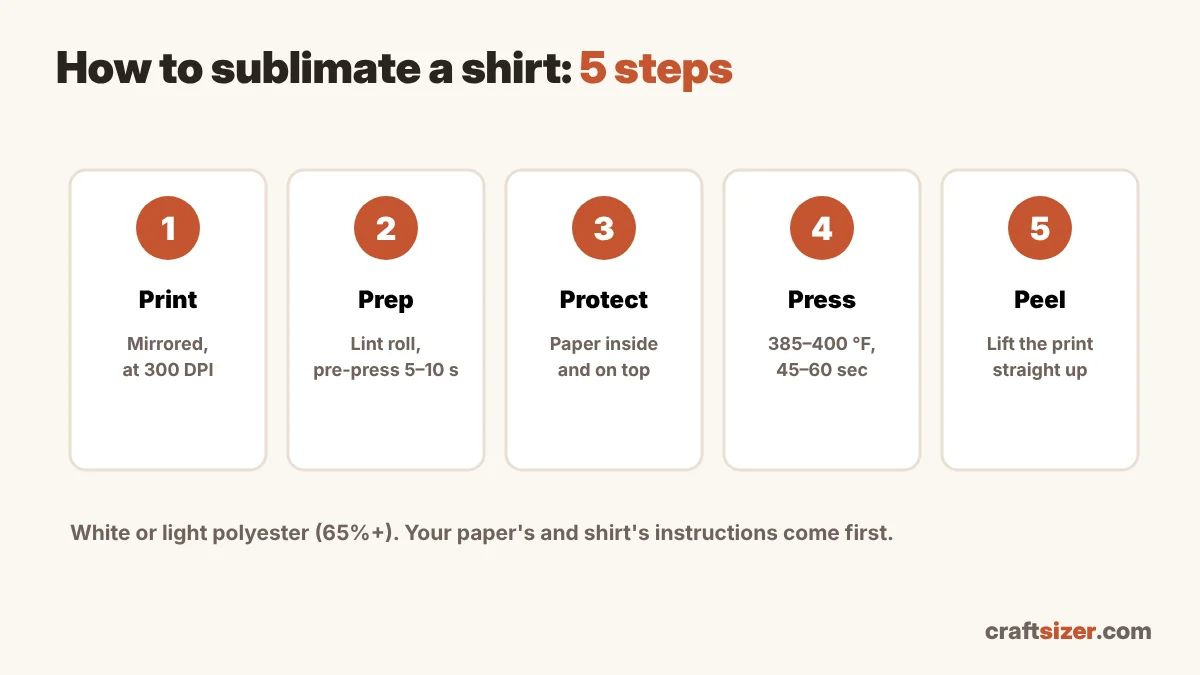
Step 1: Choose the right shirt
Sublimation only bonds with polyester, and the ink is transparent. So you need:
- Polyester content: 100% for the brightest colors, 65% or more for good color, 50/50 for a softer, vintage look.
- White or light colors. The ink won't show on dark shirts.
Cotton won't hold the ink. If you need cotton, see can you sublimate on cotton for the alternatives.
Step 2: Size and print the design
Most adult front designs are 9–11 inches wide, youth 7–9, toddler 5–7. The shirt design size calculator gives the height for your design's shape. Print at about 300 pixels per inch (check with the DPI checker), and turn on mirror so text reads correctly on the shirt.
Step 3: Prep the shirt
- Lint roll the area. Lint and fibers leave tiny white specks.
- Pre-press for about 5–10 seconds to remove moisture and wrinkles. Moisture causes blotchy prints and a brown tint.
- Put paper inside the shirt (butcher paper or plain cardstock) so ink doesn't bleed through to the back.
Step 4: Position and press
Place the print face down on the shirt. Front designs usually start about 3–4 inches below the collar on adult shirts; see the placement guide. Tape it with heat tape so it can't shift, and cover it with a sheet of butcher paper or a protective sheet.
| Shirt | Temperature | Time | Pressure |
|---|---|---|---|
| 100% polyester | 385–400 °F (196–204 °C) | 45–60 sec | Medium |
| Poly blend (50–65%) | 385–400 °F (196–204 °C) | 40–55 sec | Medium |
| Polyester hoodie | 385 °F (196 °C) | 55–60 sec | Medium |
Common starting points. Your sublimation paper's and shirt's instructions come first. Full chart: sublimation time and temperature chart.
Step 5: Peel
Open the press and lift the paper straight up in one smooth motion. Sliding it can smear the ink and cause a doubled, "ghosted" edge.
Common shirt problems
| Problem | Likely cause | Try |
|---|---|---|
| Faded or dull colors | Low polyester, or not enough time or heat | Use a higher-poly shirt; add 5–10 seconds |
| Blurry or doubled edges | Paper moved during or after pressing | Tape it; lift straight up |
| Brown or yellow tint | Moisture, or too much heat | Pre-press; lower time slightly |
| Box mark around the design | Too much pressure, or the press edge | Lower pressure, use a pressing pillow |
| Ink on the back of the shirt | No paper inside the shirt | Always put paper inside |
More fixes in sublimation problems and how to fix them.
Frequently asked questions
What temperature do you sublimate a shirt?
A common starting point for polyester shirts is 385 to 400 °F for 45 to 60 seconds with medium pressure. Follow your sublimation paper's and shirt's instructions first.
Do you mirror sublimation prints for shirts?
Yes. Turn on mirror or flip horizontal when printing, so text reads correctly once it's pressed face down onto the shirt.
Why put paper inside a shirt when sublimating?
Sublimation ink turns into a gas and can pass through thin fabric. Paper inside the shirt stops it from printing onto the back.
What shirts can you sublimate?
White or light-colored shirts with a high polyester content: 100% polyester for the brightest colors, 65% or more for good color, and 50/50 for a vintage look.